How to run a weekly team meeting that removes blockers in 30–45 minutes, using your Asana project list as the agenda backbone. Companion to Working in Asana: how to collaborate transparently.
Small teams lose hours to meetings that drift into discussion. Without a fixed structure, the weekly sync becomes a round of status monologues, and the actual blockers surface in the last five minutes, or not at all. A weekly tactical meeting fixes this: it exists to remove blockers and sync on what changed, nothing more.
The pattern
Run one weekly tactical meeting per team, 30–45 minutes for teams up to 10 people. Your Asana project list is the agenda: projects that live in Asana get discussed, projects that don't, don't exist.
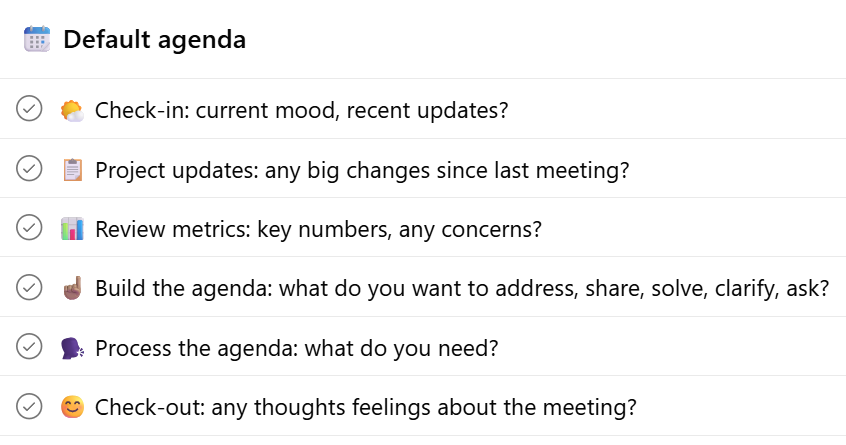
This structure comes from Holacracy's tactical meeting format (overview at Holacracy.org), but works whether or not you run Holacracy.
Default agenda items explained step by step
🌤️ Check-in: current mood, recent updates?
- What needs to be said in able to be fully present in this meeting? Keep it short.
📋 Project updates: any big changes since last meeting?
- Walk the Asana project list (shared on the screen).
- Keep updates only to what changed since last week. Nothing changed? Say "no update".
- Only clarifying questions, no discussions. If a project update leads to a tension, add it to the agenda.
📊 Review metrics: key numbers, any concerns?
- What changed since last meeting?
- Discuss KPI's, and OKRs if you have any.
☝️ Build the agenda: what do you want to address, share, solve, clarify, ask?
- Facilitator collects topics, 2–3 words each.
- Add agenda items only if they need the whole group. Don’t discuss topics that involve only two people: a shared agenda costs everyone in the room their attention. The bar for putting something on it: the whole team genuinely needs to hear it or weigh in. If not, take it offline with the relevant roles.
- Don't seek consensus on decisions you already have authority to make.
🗣️ Process the agenda: what do you need?
- Facilitator: process each item with one question: "What do you need?"
- Participants: state clear asks: "I need X from role Y."
- There are 4 valid answers to the question "What do you need?":
- 1. Someone to take action: Clarify which role the ask belongs to. Check the rolesin Moral Fabric if needed. The facilitator asks: "Can we expect this from you, given your purpose or accountabilities?" ⟶ Capture as an action item or project.
- 2. Information or input: The tension-holder wants information from one or more roles, or wants to give input on a decision. Watch the shift from asking for input to asking for permission; those are different things. Ask: "Which role is responsible for this?" ⟶ Capture as an action item.
- 3. Sharing information: The tension-holder wants to share something with the group. Watch for hidden asks: "Did sharing this give you what you needed? Or do you want reactions, or someone to act on it?" ⟶ No capture needed, unless a follow-up ask emerges.
- 4. Making an agreement: The tension-holder wants to set a lasting expectation: about roles and accountabilities, or about behavior.
- On roles and accountabilities: Make a governance proposal, in the governance meeting or asynchronously in Asana.
- On general norms and behavior: Ask the relevant people to make a working agreement, which they may accept or decline.
😊 Check-out: any thoughts feelings about the meeting?
- Brief closing.
The facilitator's job: keep it moving. Interrupt when updates turn into discussions, when people seek buy-in instead of deciding, or when items drift. Rotate the facilitator monthly so the skill spreads.
Tips for performing the Facilitator and Secretary roles well:
What to do in Asana
- Create one Asana project per team as the meeting backbone (e.g. "Projects — [Team name]"). Every active project gets a task there, named in the present perfect ("Chosen new CRM"), assigned to the accountable person — see Working in Asana for the full setup.
- Add Priority and Progress custom fields as described in Asana: getting started, step 5. Update Progress before the meeting, not during it.
- Screen-share the project board during step 4 and walk it top to bottom. This keeps updates anchored to real work and kills the "anything else?" drift.
- Capture outcomes as Asana comments or tasks during the meeting, not in separate meeting notes. The record lives where the work lives.
What's mandatory regardless
Nothing here is legally required. But if your team is remote or part-time, the weekly tactical is close to mandatory in practice: it's the one moment everyone syncs.
Your variation
Record for your organization:
- Cadence and length: weekly 30 min is the default; adjust per team size.
- Facilitator rotation: fixed or rotating, and how often.
- Your metrics: which recurring items and numbers you review in step 3.
- Governance topics: where role and policy changes go if not in this meeting (a separate governance meeting is the common pattern).